
How long can the industrial UV nozzle last? UV printer maintenance method
As industries continue to demand higher standards in product decoration and manufacturing, printing technologies have also evolved rapidly. One of the most significant innovations in recent years has been UV printing. From being a relatively unknown technology to becoming a widely adopted industrial solution, UV printers have demonstrated how continuous innovation creates new business opportunities. In the early days of UV printing, however, many users experienced issues such as immature technology, limited printhead durability, and frequent nozzle clogging. This naturally raised questions such as: How long does a UV printhead actually last? And how should a UV printer be properly maintained? Below are some practical insights into UV printheads and equipment maintenance.
Users familiar with the development of UV flatbed printers may remember that the industry's early transition from solvent-based printing to UV printing relied heavily on Epson DX5 printheads. Thanks to their 3.5 pL droplet size, these printheads offered exceptionally high printing precision. However, because early-generation UV inks had relatively poor flow characteristics, the extremely small 3.5 pL nozzles were prone to clogging. This is understandable, as smaller nozzles are naturally more susceptible to blockage than larger ones—a key reason why many industrial printheads today use droplet sizes ranging from approximately 7 to 12 pL or larger. In addition, UV inks contain chemical components that can be more demanding on printhead materials, and the plastic construction of early Epson printheads made them less suitable for long-term UV printing applications. These factors contributed to the perception that early UV printers were not yet fully mature and that printheads often required replacement after only a few months of use.
As UV printing technology continued to evolve, a variety of industrial printheads gradually replaced the earlier Epson models. These include printheads manufactured by Seiko, Kyocera, Ricoh, Toshiba, and other leading companies. Each type offers different advantages depending on the specific production requirements. The following comparison summarizes some of the commonly recognized characteristics of these printheads.
1. Printhead Price and Maintenance Cost (Highest to Lowest): Kyocera > Ricoh > Toshiba > Seiko > Epson.
2. Printing Speed and Productivity: Kyocera > Seiko > Ricoh > Toshiba > Epson.
3. Expected Service Life: Seiko > Kyocera > Ricoh > Toshiba > Epson.
4. Operational Stability: Seiko > Kyocera > Ricoh > Toshiba (relatively newer product at the time) > Epson.
5. Fine Text Printing Capability (1–2 mm Characters): Kyocera > Epson > Ricoh > Seiko > Toshiba.
6. Overall Image Quality and Color Performance: Kyocera > Seiko > Ricoh > Toshiba > Epson.
Detailed Printhead Specifications Are Shown Below:
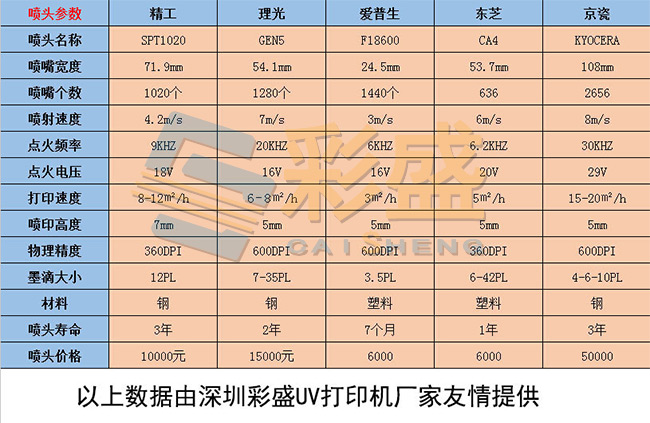
As for UV printer maintenance, reputable manufacturers typically provide on-site installation, commissioning, operator training, and maintenance guidance through experienced technical engineers. Following the manufacturer's recommended maintenance procedures is the best way to ensure stable performance and maximize the service life of the equipment.
Maintenance Tip: If the printer will not be used for 3–7 days, it is recommended to perform printhead moisturizing or capping procedures to prevent the nozzles from drying out. For periods of inactivity exceeding 15 days, clean the ink delivery system and properly preserve the printheads before storage to minimize the risk of clogging. In addition, avoid exposing the printhead carriage directly to sunlight, as ultraviolet light may prematurely cure any residual UV ink remaining on the printhead surface.